One accountable system for the services residents depend on.
Routes, trucks, crews, and resident requests in one place, with the records to prove service was performed and the reports your council and your state ask for. Fits around the utility billing your finance office already runs.
Sound familiar?
Three things that change the day.
Citizen requests
Residents submit a missed pickup, a bulk item request, a cart issue, a new service request, or a question through a resident portal instead of calling. Every request lands in one queue for the department with a status and a record of who handled it. Approved requests become work orders assigned to a route, and the resident can see their upcoming pickup schedule and service history without calling back.
The phone log, the sticky notes, the department inbox, and the spreadsheet of open complaints.
Fewer calls to the front desk. Every request is written down once, by the resident, with the address already attached.
Missed pickups get scheduled as work orders instead of dispatched by phone. Bulk and extra services that carry a fee get requested, approved, and recorded.
Works with utility billing
Most departments keep sanitation billing on the city's utility bill, and that is fine. The finance module switches off entirely, so staff see only what they use: routes, trucks, drivers, carts and containers, and resident accounts. Service records and account lists stay in one system and export for finance. If the department does bill directly (commercial accounts, roll-off, special pickups, dumpster rentals at city facilities), invoicing, online payment, and QuickBooks Online sync are ready.
A second billing system nobody asked for, and the manual handoff of service exceptions to finance.
Staff never see billing screens they do not use. Finance gets clean account and service data instead of a phone call.
No paying for modules the department will never touch. Direct-billed services, where they exist, get invoiced and collected on time.
Compliance reporting
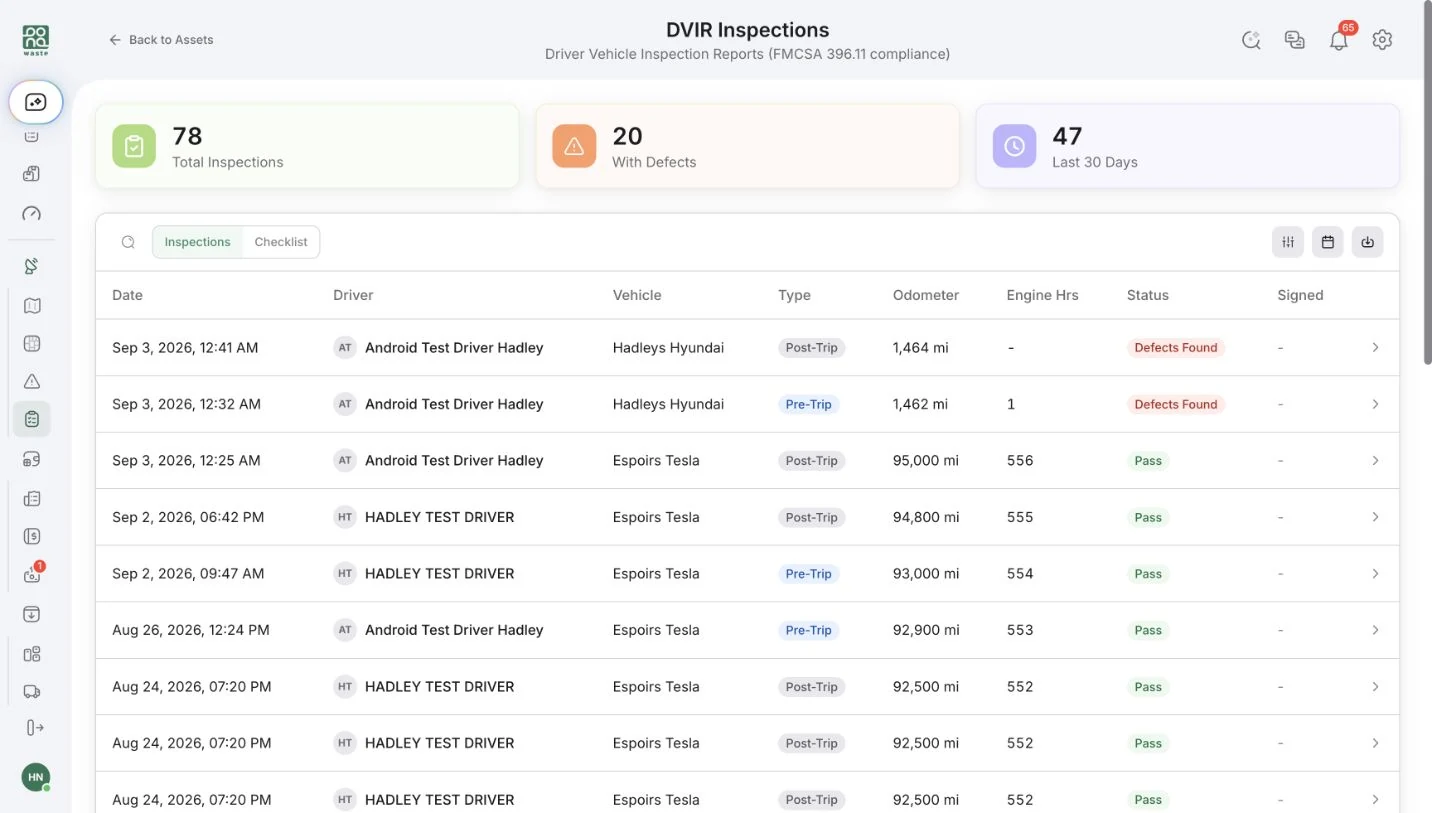
Dump ticket weights by material and facility roll up into tonnage, diversion, and cost-per-ton reports. Pre-trip and post-trip inspections are recorded per FMCSA requirements with defect photos and hour meters. Hours of service and material tracking are logged. Every stop carries a GPS timestamp, driver status, and photo, so proof of service is on file when a resident or council member asks. Every action in the system is in the audit log. Any report exports to CSV, and the “ask anything” assistant answers the questions that are not on a canned menu.
Paper tickets in a box, the DVIR binder, and the annual scramble to assemble numbers for the state.
Reports that took a week of data entry are a question typed into the assistant.
Complete tonnage records mean nothing is missed in state reporting. Proof of service reduces the cost of chasing disputed complaints.
Already included.
- Route optimization for weekly residential routes
- Live dispatch map with truck positions and driver status
- Driver app with turn-by-turn navigation and photo proof of service
- Cart and container inventory
- Fleet maintenance and fuel logs
- Email campaigns to resident accounts
- Roles and permissions
- Audit log
- Ask anything AI reporting
Accountability for the fleet, on the record.
Driving speed, hard stops, and over-limit events are captured through the driver app and reported per driver, with events per 100 miles for context. Pre-trip and post-trip inspections are recorded per FMCSA requirements with defect photos and hour meters. When council, a resident, or the state asks what happened, the answer is in the system, not in a binder.
- Driving speed, hard stops, and over-limit events captured through the driver app
- Driver-level safety reports with events per 100 miles to put route activity in context
- Pre-trip and post-trip DVIR with defect photos, odometer, and hour meters
- Issue and damage reports from the field with a photo and a GPS pin
- GPS location from the driver's own phone, shared with dispatch only while clocked in
- No tracking hardware to buy, install, or maintain, and no extra telematics fee
A day on the platform.
A resident reports a missed cart in the portal at 7 a.m. The request is in the queue when the office opens, gets approved, and becomes a work order on the afternoon route. The driver's app shows the stop, and the pickup is completed with a photo and a timestamp. The resident sees it resolved. At the transfer station, the driver photographs the ticket and the tonnage is recorded by material. At the end of the quarter, the diversion report is a question, not a project.
Where the time goes.
| Today | With Bond4Waste |
|---|---|
| Resident calls, staff logs it, dispatcher radios the truck | Resident submits; request becomes a work order on the route |
| “Did we service that address?” | GPS timestamp, driver status, and photo on the stop |
| Tonnage pulled from paper tickets for the state | Tickets read by AI, reported by material and facility |
| Fixed menu of canned reports | Any question answered, any report exported |
| DVIR binder in the truck | Digital inspection with photos, on file |
| Billing module the department cannot use | Finance module off; service data exports to finance |
What makes this different.
Getting started.
Start with a trial for one supervisor and the driver app. We migrate resident accounts and routes for you. We train the office and the drivers. Finance keeps doing what it does today.
Frequently asked.
Finance bills sanitation on the utility bill. Do we have to use your billing?
No. The finance module can be switched off completely. Resident accounts, routes, and service records stay in the platform and export for finance whenever they need them.
Can residents submit requests without calling the office?
Yes. Residents use a portal to report a missed pickup, request bulk service, or ask a question. Requests land in one queue for staff, and approved requests become work orders on a route.
Does the city need to host servers or involve IT?
No. The platform is cloud-based. Staff use a browser; drivers use the app on a phone. Access is controlled by roles and permissions, and every action is logged.
How do we know a stop was actually serviced?
Each completed stop carries the driver, a GPS timestamp, and a photo where the driver took one. When a resident disputes a pickup, the record is already there.
Can we get the numbers the state asks for?
Tonnage by material and facility comes straight from dump tickets. Diversion, cost per ton, and service counts are standard reports, everything exports to CSV, and the assistant answers questions that are not on a fixed menu.
See it running on your operation
A focused 30-minute walkthrough of your real workflows. No slides, no fluff — just the platform.