Front-load, rear-load, and roll-off accounts, run end to end.
One system for the accounts that pay the bills. Every box tracked, every route optimized, every pull and every ton billed without anyone re-keying it.
Sound familiar?
Three things that change the day.
Route optimization
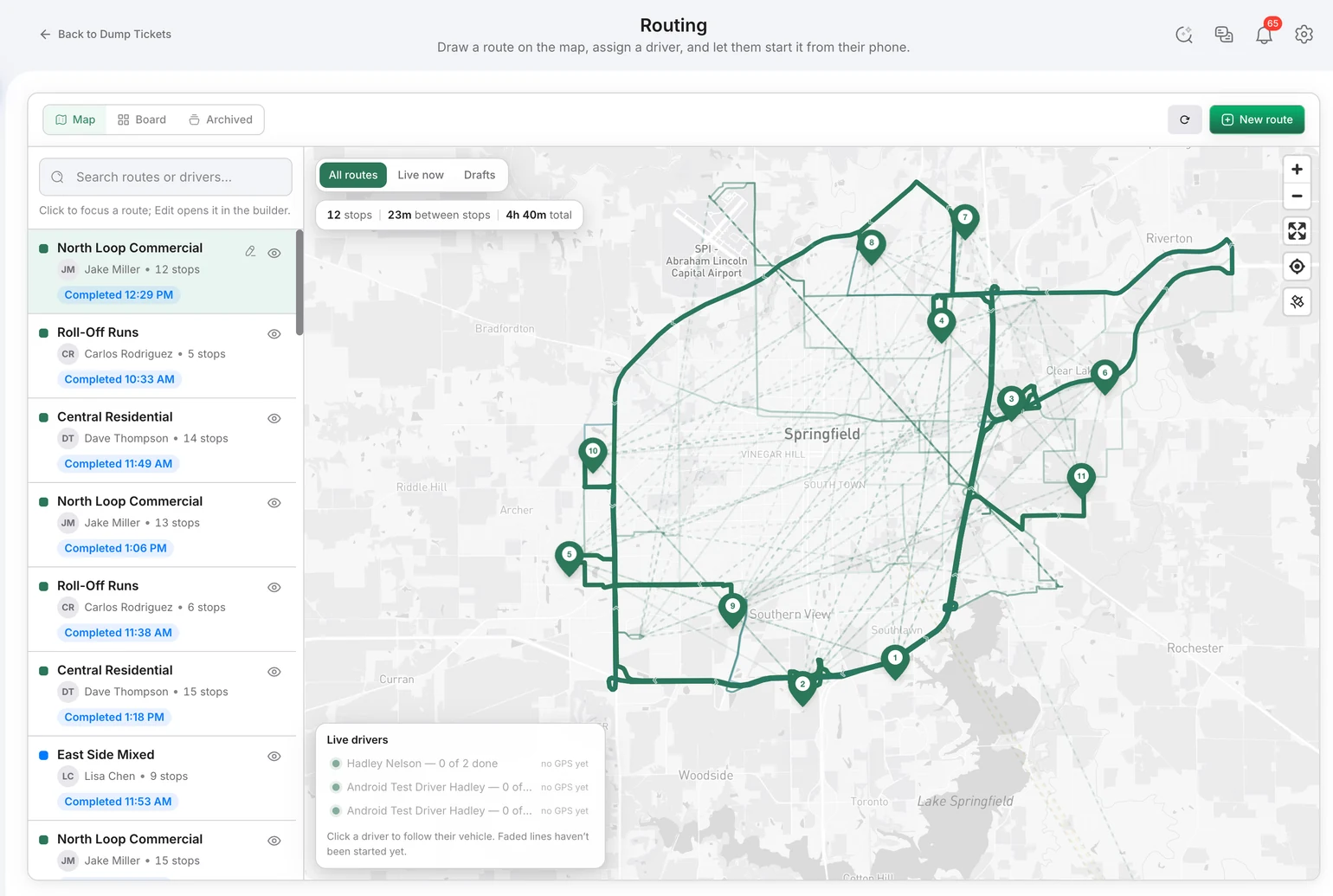
Build the day by dragging customers onto route boards on a live map. Optimize stop order across every truck in one pass, including the run to the transfer station or landfill. Recurring front-load and rear-load schedules live as templates; one-off roll-off work (delivery, swap, pull, extra pickup) drops into the day. Service zones keep trucks in their territory. Changes push to the driver's phone.
The whiteboard, printed route sheets, and the dispatcher's memory.
Dispatch builds and adjusts the day in minutes instead of an hour. Drivers get turn-by-turn in the cab and never call to ask what is next.
Fewer miles per stop, fewer missed lifts, more pulls per truck per day.
Container tracking
Every container in inventory with its size, type, status, current location (customer site, yard, or in transit), and full service history. Drivers mark a box delivered or picked up from the app with a placement photo, so the office sees where it is without asking. Maintenance queue for boxes that need repair, a swap, or retirement.
The box spreadsheet, the standalone container-tracking app, and phone calls to drivers asking where the 30-yard went.
No more chasing drivers for locations. No more end-of-month reconciliation between the tracking tool and billing.
Fewer lost boxes. Fewer boxes bought because you can see what is sitting in the yard. Rental days and swaps end up on the invoice.
Automated billing
When a work order is completed, the invoice is generated (or waits for your approval if you prefer to review first; automatic invoicing can be switched off). Rate cards assign per customer and per asset, so the same box can price differently by site or by job. Dump ticket weights attach to the invoice as pass-through disposal. Recurring service agreements bill on schedule. Overdue invoices get an automatic follow-up sequence. Customers pay online. Everything syncs to QuickBooks Online.
End-of-month invoice marathons, the “unbilled” pile, and re-keying between routing, tickets, and accounting.
Invoices go out the day of service. Collections run themselves until someone needs a phone call.
Every pull, overage, and ton gets billed. Cash comes in faster. Cost per ton is visible per customer, so unprofitable accounts show up.
Already included.
- Live dispatch map
- Driver app with turn-by-turn navigation
- Photo and signature proof of service
- Bill of lading with signature
- DVIR inspections and fleet maintenance
- Fuel and expense capture from the cab
- Scale house operations
- Sales CRM and pipeline to win new accounts
- Email campaigns
- Customer portal
- Ask anything AI reporting
- Audit log
- Multi-location dashboard
Fleet safety and compliance, without the hardware.
Every truck reports speed, hard stops, and over-limit events through the driver app, so you can see how the fleet is actually being driven without fitting a tracker to a single cab. Safety reports sit next to DVIR defects and field issues, which is where the record you need lives when an insurer, an auditor, or a customer asks.
- Driving speed, hard stops, and over-limit events captured through the driver app
- Driver-level safety reports with events per 100 miles to put route activity in context
- Pre-trip and post-trip DVIR with defect photos, odometer, and hour meters
- Issue and damage reports from the field with a photo and a GPS pin
- GPS location from the driver's own phone, shared with dispatch only while clocked in
- No tracking hardware to buy, install, or maintain, and no extra telematics fee
A day on the platform.
Dispatch builds tomorrow's routes tonight and hits optimize. Drivers clock in, run the pre-trip inspection on the phone, and start the route. Each stop is completed with a photo; each roll-off delivery or pull updates the container's location. At the landfill, the driver photographs the scale ticket and the system reads the weight. Back at the office, the ticket is already on the customer's invoice as pass-through disposal, and the invoice is waiting in the outbox, or already sent.
Where the time goes.
| Today | With Bond4Waste |
|---|---|
| Dispatcher sequences the day by hand | Multi-truck optimization in one click |
| Driver calls in for the next stop | Turn-by-turn in the cab, stop order on the phone |
| Where's the 30-yard? | Container location and history on one screen |
| Ticket keyed in from a photo or a paper pile | AI reads the ticket; driver confirms in the cab |
| Invoices built at month end | Invoice generated when the work order completes |
| Overdue accounts chased by hand | Automatic follow-up sequence, AR aging on the dashboard |
| Reports pulled into Excel | Ask a plain-English question, get the number |
What makes this different.
Getting started.
Start with a free trial. We handle the migration of your customers, containers, and routes. We train your dispatcher and your drivers. No IT project on your side.
Frequently asked.
Can we run front-load routes and roll-off work orders in the same system?
Yes. Recurring front-load and rear-load schedules run as route templates. Roll-off deliveries, swaps, and pulls are work orders that drop into the day and get optimized alongside everything else.
Can we price the same container differently by customer or job site?
Yes. Rate cards assign per customer and per asset, so a 30-yard at one site can carry a different rate than the same box at another.
What happens to a dump ticket after the driver photographs it?
The system reads the facility, weights, material, and fees. The driver confirms. The office reviews it in a queue, and it attaches to the customer's invoice as pass-through disposal or an absorbed cost.
We already use QuickBooks. Does it sync?
Yes, with QuickBooks Online. Customers, invoices, and payments sync both ways, with expense accounts mapped the way your accountant wants them.
What if we don't want invoices going out automatically?
Turn automatic invoicing off. Invoices are still generated from completed work, but they wait for your approval before anything is sent.
See it running on your operation
A focused 30-minute walkthrough of your real workflows. No slides, no fluff — just the platform.